🏥 Bed Management
Track real-time bed availability across all wards, admit patients to beds, and manage bed-related charges. When a patient is discharged, bed charges are automatically billed.
Navigate to Hospital → Beds (or the Bed Allocation card on the Inpatient hub). Available to Hospital Admin, Ward Manager and Receptionist.
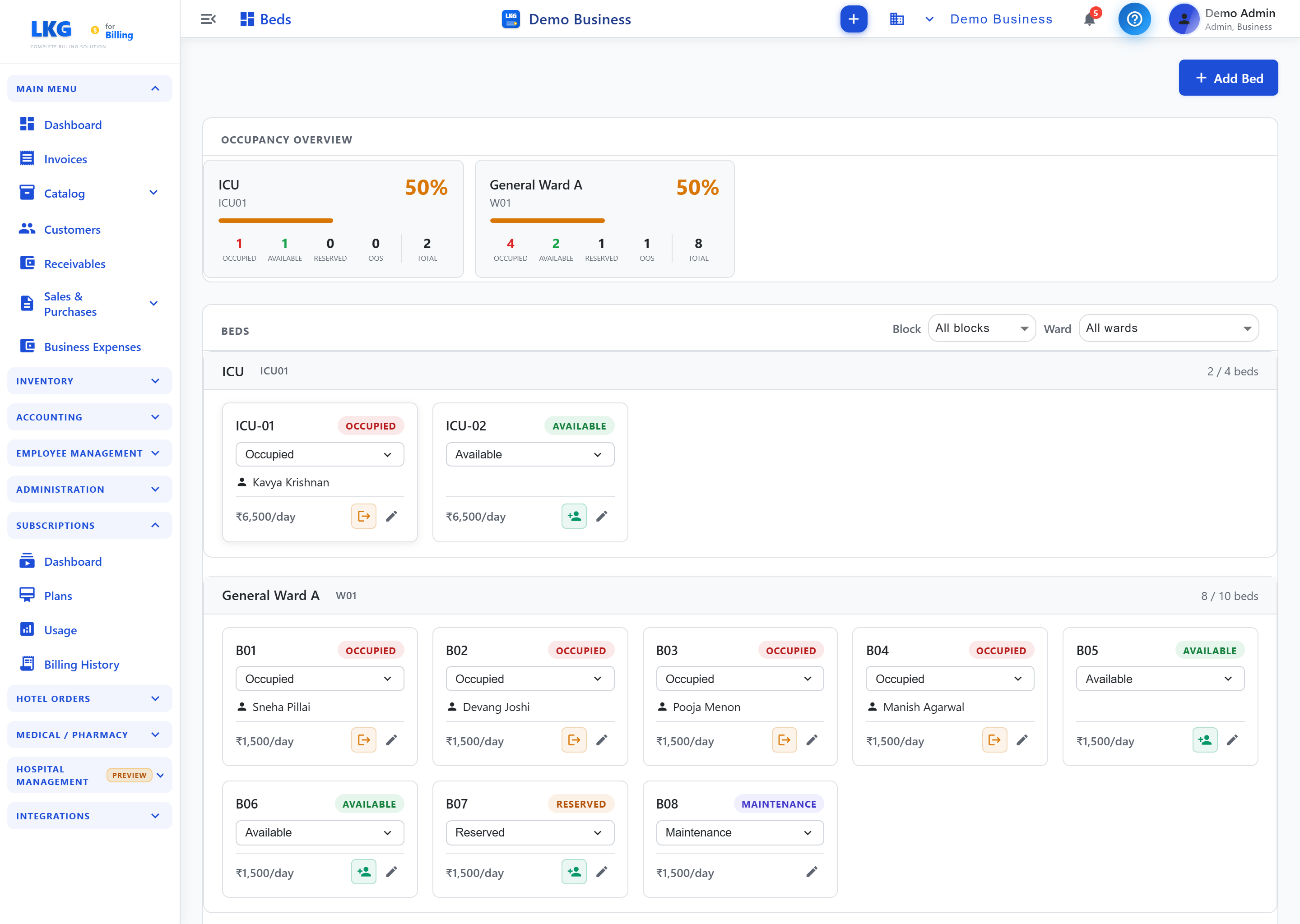
Occupancy Overview
A card per ward shows counts of Occupied / Available / Reserved / OOS (out of service) / Total with a % occupancy bar.
Beds
Below the overview, beds are grouped by ward and can be filtered by Block and Ward. Each bed is a card showing:
| Element | Description |
|---|---|
| Bed number | e.g. ICU-01, B01 |
| Status | Dropdown — Occupied / Available / Reserved / Maintenance |
| Patient | The occupying patient (when occupied) |
| Charge | Bed charge per day (e.g. ₹1,500/day) |
| Actions | Admit (to a vacant bed), Discharge (free an occupied bed), Edit |
Use + Add Bed to add a new bed.
Workflow
- Configure wards first — see Ward Management.
- Admit a patient to a vacant bed from its card.
- Bed charges accrue per day and are billed to the patient's inpatient stay.
- Discharge frees the bed for the next patient.