Pharmacy
The Pharmacy page is an approval queue for prescriptions raised during consultations. Reached from Medical / Pharmacy → Pharmacy.
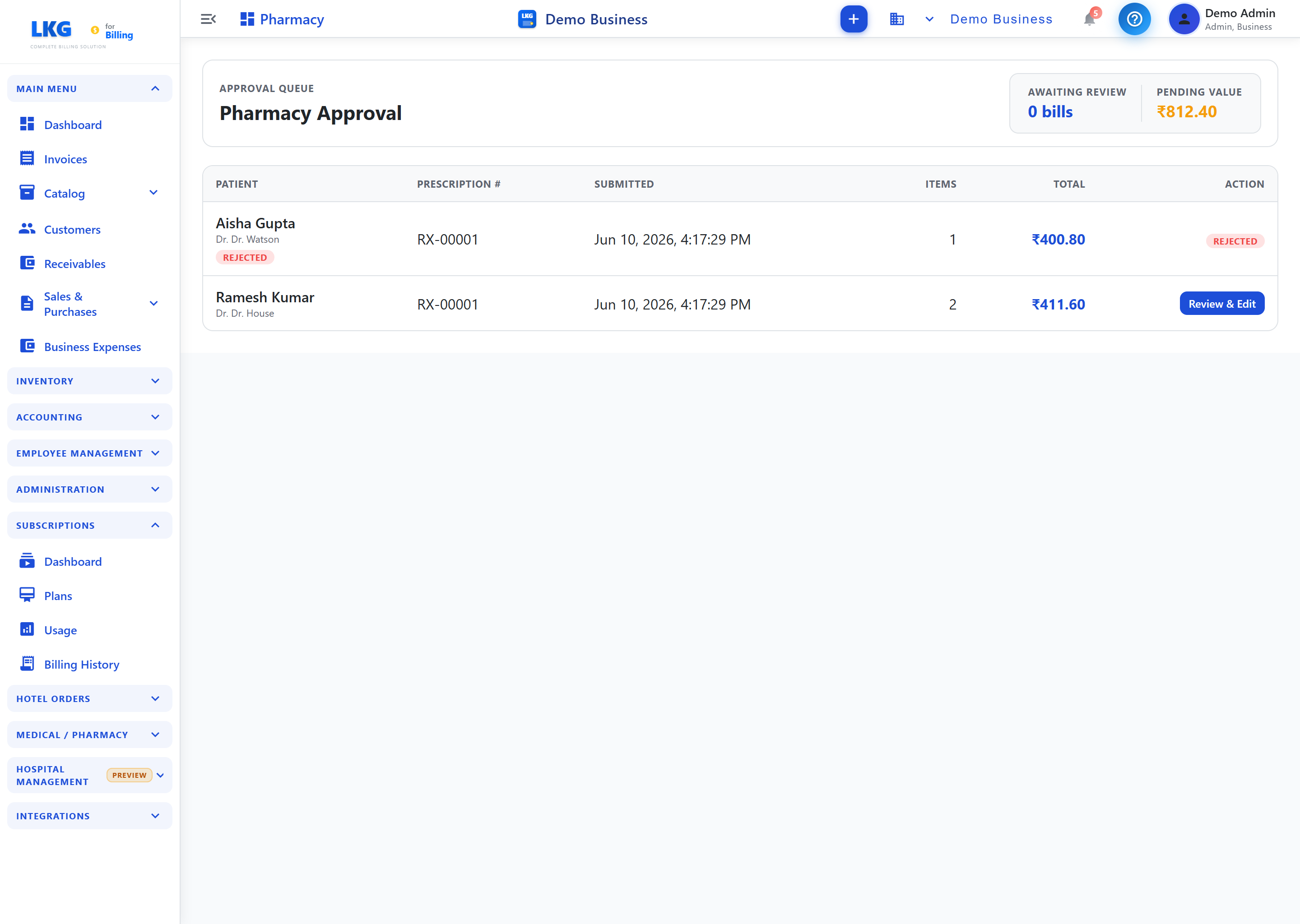
Header cards
| Card | Shows |
|---|---|
| Awaiting Review | Number of prescription bills waiting for review |
| Pending Value | Total value of pending prescriptions |
Approval queue
| Column | Description |
|---|---|
| Patient | Patient name and prescribing doctor; shows a status chip (e.g. Rejected) |
| Prescription # | Prescription reference (e.g. RX-00001) |
| Submitted | Date and time the prescription was submitted |
| Items | Number of medication line items |
| Total | Prescription total (₹) |
| Action | Review & Edit to process it, or the current status |
Workflow
- A doctor prescribes medicines in a consultation
- The prescription lands here as awaiting review
- Click Review & Edit to check items, quantities and stock
- Approve & dispense (which raises the pharmacy invoice) or Reject
- Dispensed pharmacy charges are billed to the patient and reflected in their Pharmacy Balance in the Patient Directory
Roles: Pharmacy Manager, Hospital Admin.
Related
- Consultations — where prescriptions originate
- Patients — patient pharmacy balances
- Hospital Overview