🏥 Imaging & Scan Management
Request diagnostic imaging studies (X-ray, Ultrasound, CT, MRI, etc.), track scan orders, upload reports, and generate invoices for imaging services.
Navigate to Hospital → Imaging & Scans.
Overview
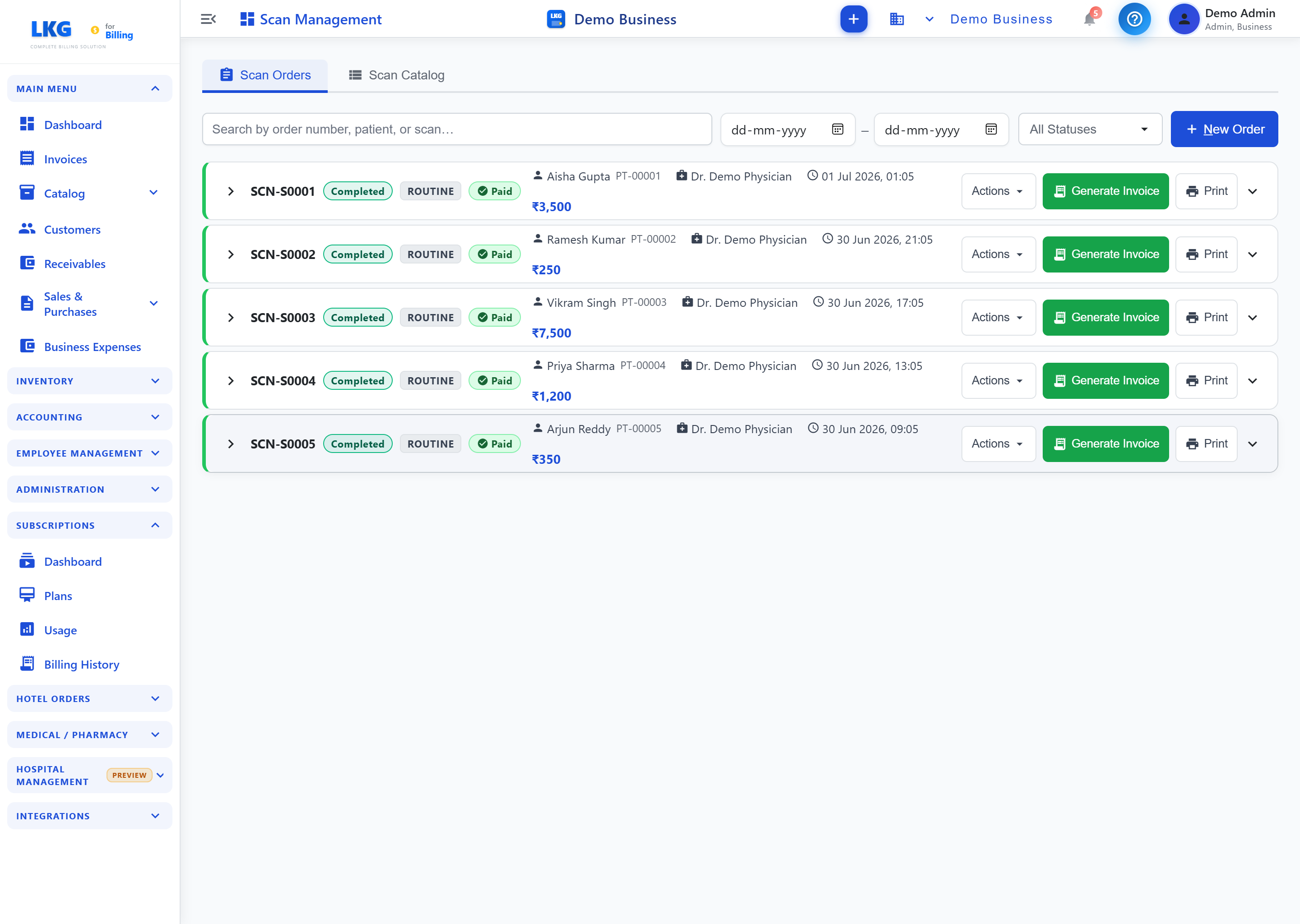
Imaging Management has two tabs:
| Tab | Purpose |
|---|---|
| Scan Orders | Create and track patient imaging orders |
| Scan Catalog | Define available imaging services |
Scan Orders
| Control | Description |
|---|---|
| Search by order number, patient, or scan... | Search orders |
| Date range (From / To) | Filter by order date |
| All Statuses | Filter orders by status |
| + New Order | Create a new scan order |
Each order row shows:
| Field | Description |
|---|---|
| Order # | Order identifier (e.g., SCN-S0001) |
| Status | e.g., Completed |
| Priority | e.g., Routine |
| Payment Status | e.g., Paid |
| Patient | Patient name and ID |
| Ordered By | Requesting doctor |
| Date & Time | When the order was placed |
| Price | Order amount (₹) |
| Actions | Dropdown of order actions |
| Generate Invoice | Create the billing record for this order |
| Print the order/report |
Click the chevron on a row to expand it for more detail.