Audit trail on every record
Every chart, bill, and bed move is timestamped with the user who did it. Inspections, accreditations, and regulator queries become a five-minute report instead of a five-day audit.
LKG for Hospital is one record for the front desk, the consulting room, the ward, the lab, the pharmacy, and the billing counter. No rekeying. No paper files walking the corridor. No spreadsheets at the end of the day.
Each module is built on the same patient. Touch the chart in the consulting room and the pharmacy sees it. Order a scan and the cashier sees it. Discharge and the bed opens itself.
every chart, where it should be
A single source of truth for patients — demographics, history, allergies, lab values, scans. Built around the consultation, not forms.
Read the guidedoctors, rooms, and patients on the same page
Multi-doctor calendars, recurring slots, walk-ins, and SMS reminders. One drag to reschedule.
Read the guideactivity and healthcare revenue in one view
Hospital activity counts and healthcare-specific financial analysis for clinics and hospitals.
Read the guideinventory that knows what is about to expire
Approve prescribed medicines and keep the patient pharmacy balance accurate.
Read the guidea quiet map of the hospital, in real time
Floor plans, ward types, bed availability, transfer history. Admit, discharge, and transfer with full audit trail.
Read the guideorder, sample, result, report
Order test panels from the consultation, track sample collection, and attach results to the patient chart with a printable lab report.
Read the guideBuilt to run the whole hospital, not just a part of it.
10
modules, one record.
OP, IP, lab, imaging, pharmacy, beds, billing — everything points at the same patient.
0×
re-entry between desks.
The chart you opened in the consulting room is the chart the cashier closes. No re-typing. No paper.
1
flat monthly fee.
No per-bed, per-doctor or per-prescription pricing. Self-host or cloud, your choice.
No complex installations. Our team configures, imports your data, and trains your staff while you keep running.
Our specialists configure the system to match your hospital's workflows, wards, departments, and compliance requirements.
Role-based training for doctors, nurses, and admin staff. We import your patient list and run staff through real workflows.
Launch with confidence. Our team monitors your system and is reachable by WhatsApp, phone, or email — because hospitals don't stop at 5 pm.
Get started with LKG for Hospital. No commitment required.
◇ The modules
Each module is built on the same patient. Touch the chart in the consulting room and the pharmacy sees it. Order a scan and the cashier sees it. Discharge a patient and the bed opens itself.
A single source of truth for patients — demographics, history, allergies, prescriptions, lab values, scans. Built around the consultation, not around forms.
Read the patient directory guide →Structured consultation forms for OP and follow-up visits, with editable history, vitals, assessment, plan, and prescription. A clean, printable summary every time.
Read the new consultation guide →Review consultation records, prescribed medicines, and patient history from the patient record.
Read the patient history guide →Multi-doctor calendars, recurring slots, walk-ins, and SMS reminders. Reschedule with one drag; cancellations free the slot for the next patient.
Read the appointments & scheduling guide →Live token boards for OP and pharmacy counters. Patients see where they stand; staff see what is next. No more shouting names down a corridor.
Read the token queue guide →Floor plans, ward types, bed availability, transfer history. Admit, discharge, and transfer with the audit trail every regulator wants to see.
Read the wards & beds guide →Order test panels from the consultation, track sample collection, and attach results to the patient chart with a printable lab report.
Read the lab & investigations guide →A scan booking workflow with technician assignment, equipment availability, and a structured report that links back to the patient timeline.
Read the imaging & scans guide →Approve medicines prescribed during consultations and keep the patient pharmacy balance accurate.
Read the pharmacy guide →Review hospital activity counts and healthcare-specific financial reporting for clinics and hospitals.
Read the hospital reports guide →Clean, intuitive interfaces built for clinicians and administrators — on any browser, tablet, or counter PC.
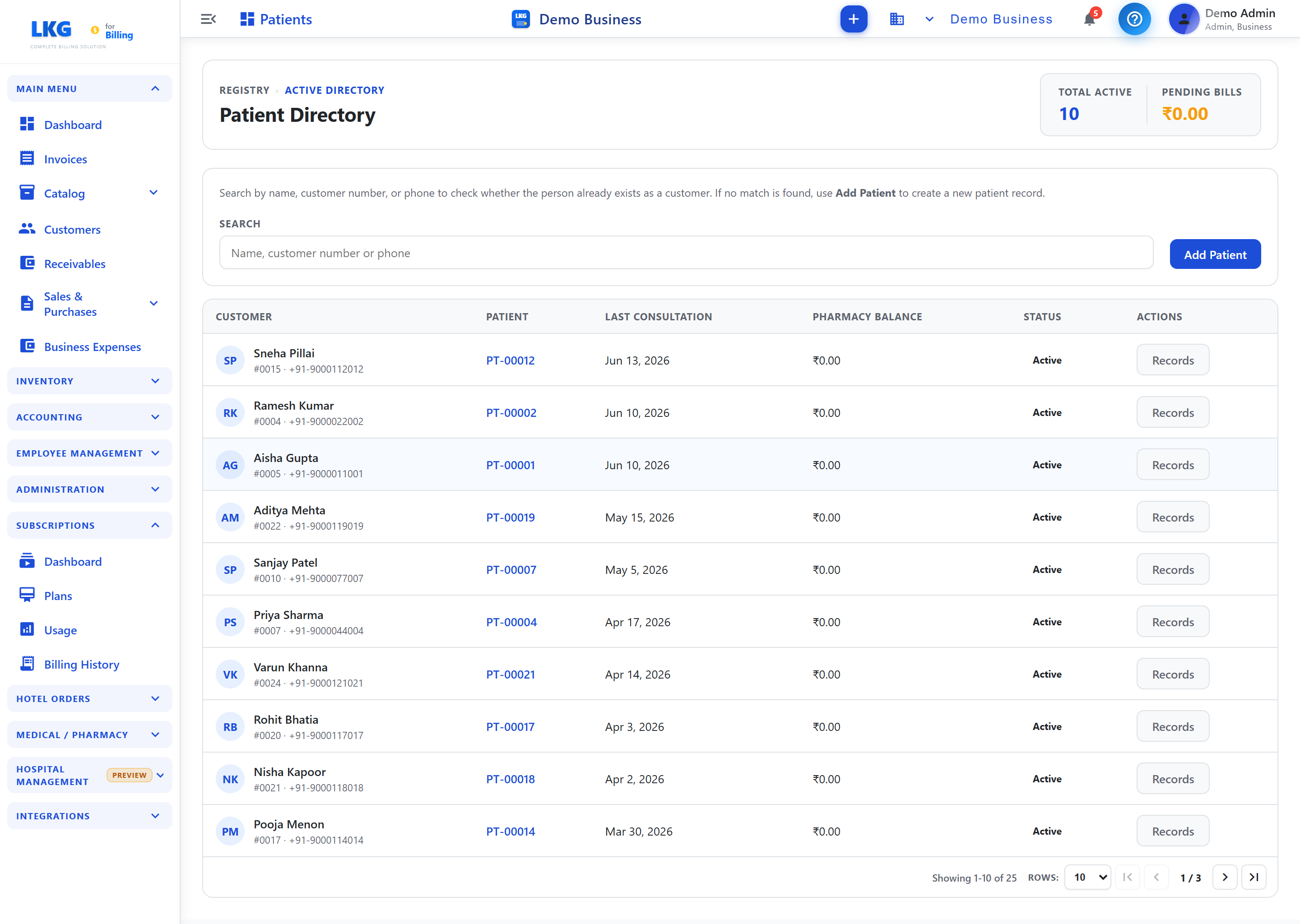
Patient registry with records, balances, and actions
◇ Workbench
Open one window in the morning. Watch the OP queue, the wards, the lab orders, and the cashier — all on one page. Drill into anything; nothing hides behind another tab.
◇ A morning in OP
Mrs. Lakshmi's token comes up on the corridor screen. She is wheeled into Room 3. Dr. Krishnan opens her chart on the tablet — last visit, last lab, last scan, all there. He records the consult; the symptoms, diagnosis, advice, and medicines are saved into the patient history before the visit closes.
He orders a fresh CBC and a chest X-ray. The lab counter sees the order before she has stood up. The pharmacy sees the prescription before she reaches the counter. By the time she reaches billing, every line item — consult, lab, X-ray, tablets — is already on a single bill.
She pays. The bed she vacated this morning is freed on the ward map. The doctor's next patient is already standing. Nobody walked a paper file anywhere.
That is the whole product.
◇ Built in
Every chart, bill, and bed move is timestamped with the user who did it. Inspections, accreditations, and regulator queries become a five-minute report instead of a five-day audit.
Each consultation adds to the same patient timeline, so doctors, reception, and pharmacy can review the visit record without re-entering details.
Browser, tablet, or counter PC. The interface adapts; the data does not move. Self-host on your own server, or run on our managed cloud — your choice.