Adresář pacientů
Adresář pacientů je centrální registr všech pacientů. Vyhledejte existující pacienty, zobrazte jejich historii konzultací a zůstatek v lékárně nebo zaregistrujte nové pacienty.
Přejděte na Adresář pacientů v postranním panelu v části Zdravotnictví / Lékárna.
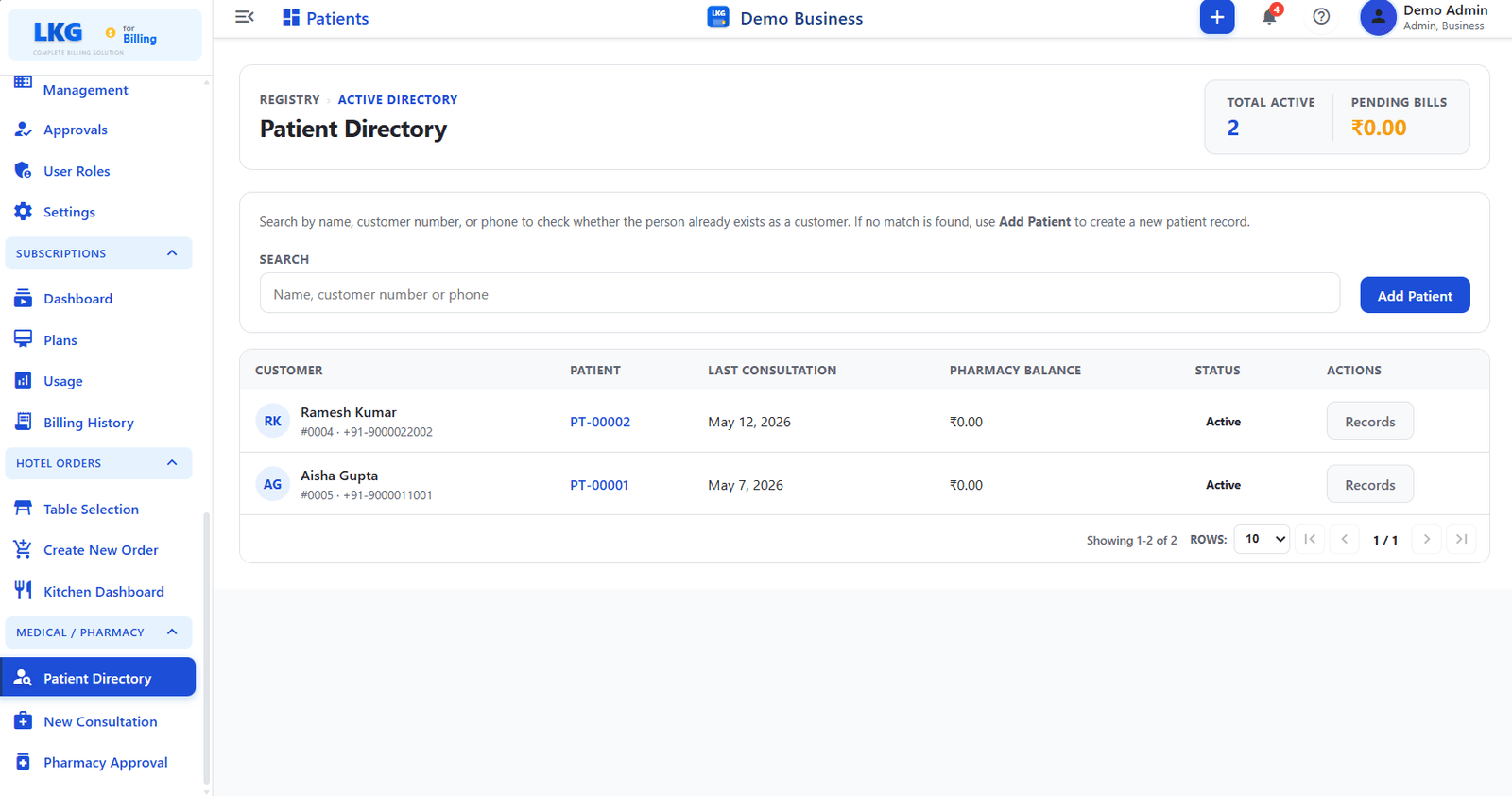
Záhlaví stránky
| Pole | Popis |
|---|---|
| Celkem aktivních | Počet aktuálně aktivních pacientů v registru |
| Nevyřízené účty | Celkový neuhrazený zůstatek lékárny za všechny pacienty |
Vyhledávání
Use the search bar to find an existing patient by:
| Search Input | Popis |
|---|---|
| Name | Patient full name |
| Customer number | Linked customer account number |
| Phone | Registered phone number |
If no match is found, use Add Patient to create a new patient record.
Add Patient
Kliknutím na tlačítko Add Patient vpravo od vyhledávacího pole zaregistrujete nového pacienta. Systém před vytvořením nového záznamu ověří, zda osoba již neexistuje jako zákazník.
-177f658e50b4c35dbd72f73a4f854edd.png)
| Pole | Povinné | Popis |
|---|---|---|
| Patient Name | ✅ | Full name of the patient |
| Patient Type | — | Type of patient, such as Individual |
| Phone | ✅ | Contact number with country code selector |
| Date of Birth | — | Date picker; age is calculated automatically, for example "Age: 29 years" |
| Pincode | — | Postal code |
| State | — | State or region dropdown |
| Country | — | Country dropdown |
| Address | ✅ | Full address |
| — | Email address | |
| Tax | — | Optional tax ID |
Click Save Customer to create the patient record, or Cancel to discard.
Seznam pacientů
| Sloupec | Popis |
|---|---|
| Customer | Customer account linked to the patient — shows name, customer number, and phone |
| Patient | Patient ID, for example PT-00001 or PT-00002 — click to open the patient record |
| Last Consultation | Date of the most recent consultation visit |
| Pharmacy Balance | Outstanding balance on the patient pharmacy account |
| Stav | Aktivní nebo neaktivní |
| Actions | Records opens the patient full history and past consultations |
Akce pacienta
| Tlačítko | Popis |
|---|---|
| Records | |
| Opens the Patient History page for that patient |
tip
Click the Patient ID link, for example PT-00002, directly in the list to jump to that patient history page.