Patientregister
Patientregisteret er det centrale register for alle patienter. Søg efter eksisterende patienter, se deres konsultationshistorik og apotekssaldo, eller registrer nye patienter.
Gå til Patientregister i sidepanelet under Medicinsk / Apotek.
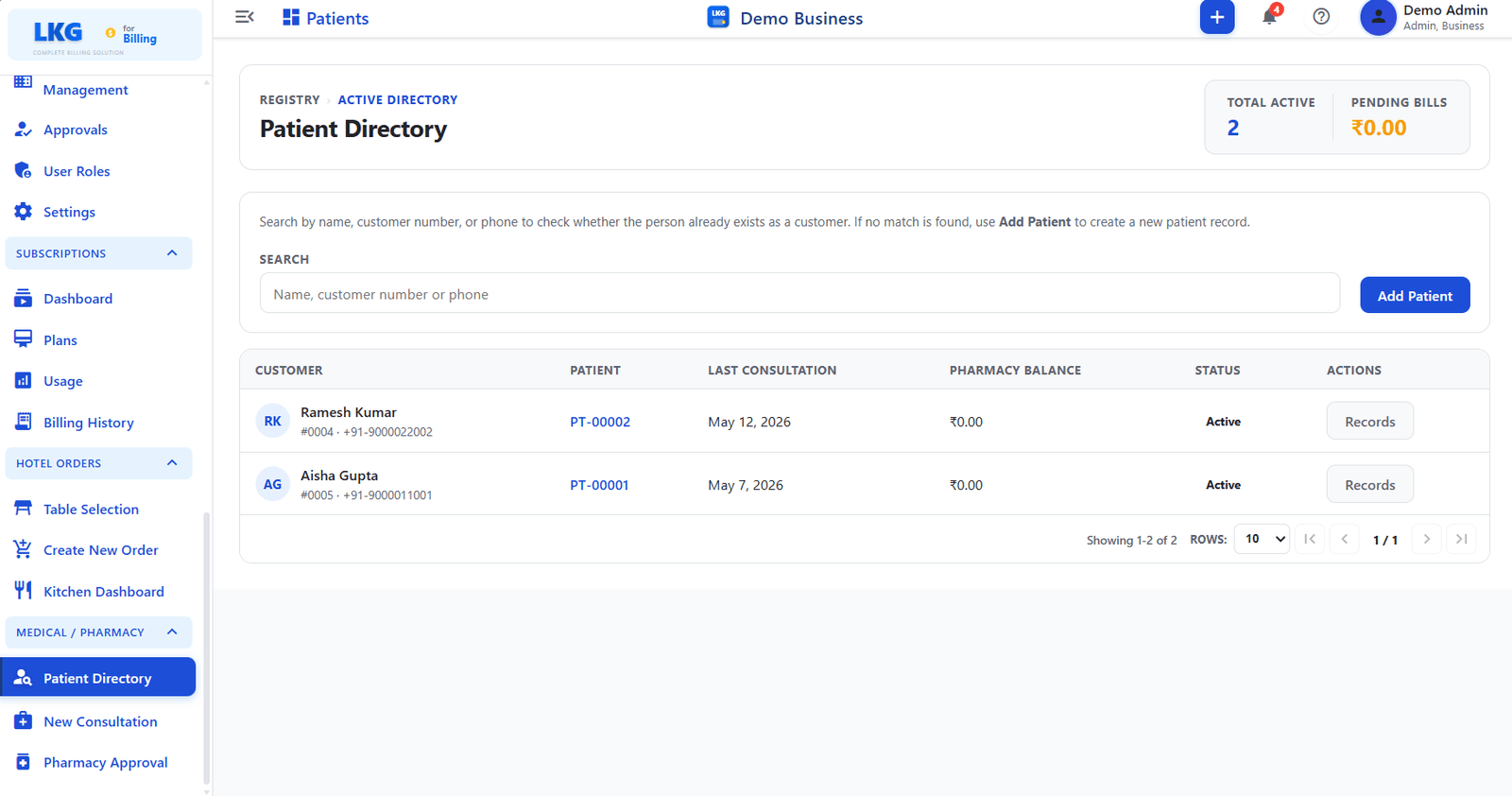
Sidehoved
| Felt | Beskrivelse |
|---|---|
| Aktive i alt | Antal aktive patienter i registret |
| Afventende regninger | Samlet udestående apotekssaldo for alle patienter |
Søgning
Use the search bar to find an existing patient by:
| Search Input | Beskrivelse |
|---|---|
| Name | Patient full name |
| Customer number | Linked customer account number |
| Phone | Registered phone number |
If no match is found, use Add Patient to create a new patient record.
Add Patient
Klik på knappen Add Patient til højre for søgefeltet for at registrere en ny patient. Systemet kontrollerer, om personen allerede findes som kunde, før der oprettes en ny post.
-177f658e50b4c35dbd72f73a4f854edd.png)
| Felt | Påkrævet | Beskrivelse |
|---|---|---|
| Patient Name | ✅ | Full name of the patient |
| Patient Type | — | Type of patient, such as Individual |
| Phone | ✅ | Contact number with country code selector |
| Date of Birth | — | Date picker; age is calculated automatically, for example "Age: 29 years" |
| Pincode | — | Postal code |
| State | — | State or region dropdown |
| Country | — | Country dropdown |
| Address | ✅ | Full address |
| — | Email address | |
| Tax | — | Optional tax ID |
Click Save Customer to create the patient record, or Cancel to discard.
Patientliste
| Kolonne | Beskrivelse |
|---|---|
| Customer | Customer account linked to the patient — shows name, customer number, and phone |
| Patient | Patient ID, for example PT-00001 or PT-00002 — click to open the patient record |
| Last Consultation | Date of the most recent consultation visit |
| Pharmacy Balance | Outstanding balance on the patient pharmacy account |
| Status | Aktiv eller inaktiv |
| Actions | Records opens the patient full history and past consultations |
Patienthandlinger
| Knap | Beskrivelse |
|---|---|
| Records | |
| Opens the Patient History page for that patient |
råd
Click the Patient ID link, for example PT-00002, directly in the list to jump to that patient history page.